
Reads your existing export
Drop in the CSV or XLSX your hotspot or MikroTik system already generates. Columns are detected automatically - you just confirm.
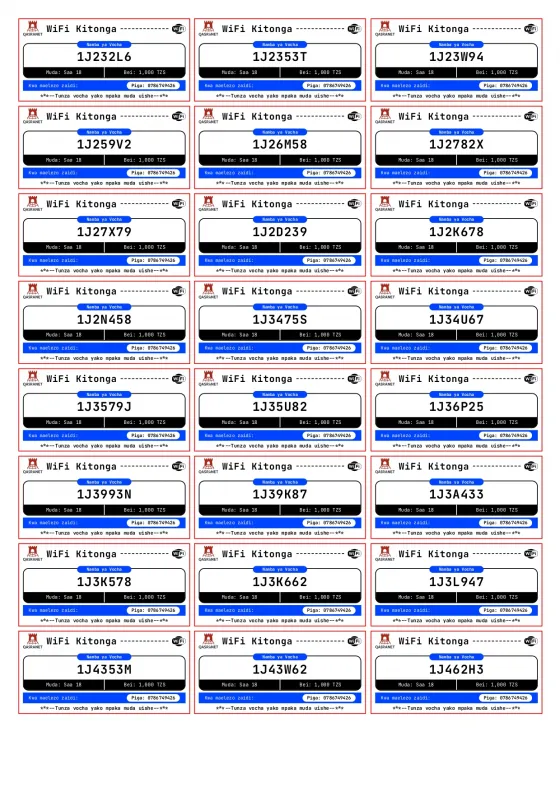
Upload the CSV or Excel file your hotspot system already produces. Pick a design, choose how many vouchers fit on a page, and download a clean PDF ready for the printer.
No card required · 15,000 vouchers free every month · browse the 120 designs
Built around the same voucher engine that powers MikroISP, so what you preview on screen is exactly what lands on paper. Read how it works.
Drop in the CSV or XLSX your hotspot or MikroTik system already generates. Columns are detected automatically - you just confirm.
From plain and thermal-friendly to bank-note, arcade and Kente styles. Switch design and the whole batch re-renders instantly.
Choose A4 or Letter, portrait or landscape, and how many vouchers sit on each page. Optional cut guides make trimming quick.
Set your business name, logo, contact line and footer message once. Every export carries them automatically.
Vouchers are rendered in your own browser and never leave it as images. Uploaded files are deleted after 7 days.
Thousands of vouchers render page by page with a live progress bar, so a full month of stock is one download.
No software to install - it all runs in your browser. Watch the whole thing below.
Drag in a CSV or Excel file of vouchers. We show you the first rows so you can check it arrived intact.
We guess which columns hold the code, duration and price. Change any of them from a dropdown if we guessed wrong.
Preview any of the 120 designs with your own branding, then set the paper size and vouchers per page.
Pages render one by one with a progress bar. When it finishes, the PDF saves straight to your device.
120 designs installed - here are a few.
Start free. Ask us when you outgrow it.
CSV and Excel .xlsx files. If you have an old .xls file, open it and re-save it as .xlsx or CSV first. Files up to 8 MB are accepted on the free plan.
No. We look at your headers and your data to work out which column holds the voucher code, the duration and the price - and you can correct any of them from a dropdown before exporting. Files with no header row work too.
Leave the column unmapped. The voucher design simply renders without that line, and you can also switch price or duration off entirely in your branding settings.
You decide. Set the columns and rows per sheet - a common choice is 2 across by 5 down on A4, giving 10 vouchers a page. Cut guides can be printed between them.
The uploaded spreadsheet is stored on our server only so you can come back to it, and it is deleted automatically after 7 days. The PDF itself is built inside your browser and is never uploaded anywhere.
Yes. Upload your logo and a small corner icon once in Branding, along with your business name, contact line and footer message. Every export from then on carries them.
Create an account, upload a spreadsheet, and download your first PDF sheet in a couple of minutes.


